Nokia released technology previews of Qt 4.7 and Qt Creator 2.0. Also in this release is the first introduction of Qt Quick: a new high-level UI technology that enables developers and designers to work together to create animated, touch-enabled UIs and lightweight applications. Qt 4.7 and Qt Creator 2.0 are scheduled for release in mid-2010 as part of the Qt SDK, with interim beta releases planned.
These technology preview releases are available for download, testing and feedback at:
http://qt.nokia.com/developer/qt-qtcreator-prerelease.
Qt 4.7: The Designer & The Developer
Qt 4.7 and Qt Creator 2.0 bring Qt Quick, and the performance and quality to make it shine. The Designer and the Developer work hand in hand. Check it out.
Friday, March 12, 2010
Monday, February 22, 2010
Updated Qt SDK Released : Qt SDK 2010.02.1 available for download now for Windows platform.
Nokia released an update to the Qt SDK for Windows – a single binary package that includes everything needed to build cross-platform applications with Qt. The update addresses a bug which caused the Qt Creator IDE to crash under certain circumstances on the Windows platform. The Qt SDK on other platforms, Qt itself, and the Qt Creator standalone packages are not affected. For more information, please read the blog post on Qt Labs.
The updated version 2010.02.01 of the Qt SDK for Windows is available for download now from http://qt.nokia.com/downloads.

Monday, February 15, 2010
Nokia Releases Qt 4.6.2
Nokia released version 4.6.2 of Qt on 15 February 2010: the cross-platform application and UI framework. This release brings a new Smart Installer for Symbian (Beta) and a Qt port to Maemo 5, in addition to bugfixes and optimizations made since the release of Qt 4.6.1 in January. Also released today is an update to the Qt Visual Studio Add-in, as well as an updated build of the Qt SDK.
All Qt releases are available for download from http://qt.nokia.com/downloads.
Source: http://qt.nokia.com/about/news/nokia-releases-qt-4.6.2
All Qt releases are available for download from http://qt.nokia.com/downloads.
Source: http://qt.nokia.com/about/news/nokia-releases-qt-4.6.2
Qt for Symbian - Setting up Qt for Symbian
Alessandro Portale, Software Engineer at Nokia, Qt Development Frameworks, shows how to set up Qt for Symbian.
Download link: http://qt.nokia.com/downloads
Thursday, January 21, 2010
Nokia Releases Qt 4.6.1 and Qt Creator 1.3.1
 Nokia today released version 4.6.1 of Qt on 19 January 2010: the cross-platform application and UI framework, and version 1.3.1 of Qt Creator: the cross-platform IDE for Qt development . Qt 4.6.1 brings improvements to developers targeting Symbian, most notably introducing a binary compatibility guarantee as announced with the Qt 4.6.0 release in December 2009. Both releases introduce bug fixes and optimizations made since the Qt 4.6.0 and Qt Creator 1.3.0 releases.
Source>>>
Thursday, December 17, 2009
Qt for Symbian - Setting up a Symbian/S60 development environment
This quick start video describes how to set up a basic Symbian/S60 development environment on Windows.
Download links:
http://bit.ly/ovisuite
http://bit.ly/carbidecpp
http://bit.ly/activeperl56
http://bit.ly/s60sdk
http://bit.ly/openc
http://bit.ly/apptrk
Friday, December 4, 2009
Hello! My First Widget, a very simple Qt application with a PushButton.
In this work, I will create a very simple Qt Application with a dummy button (inherite from QPushButton), start from Empty Qt Project.
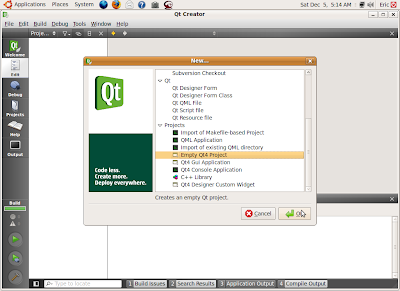
Start QtCreator, click File -> New project or Project... on the top menu, Select Empty Qt Project under Project.
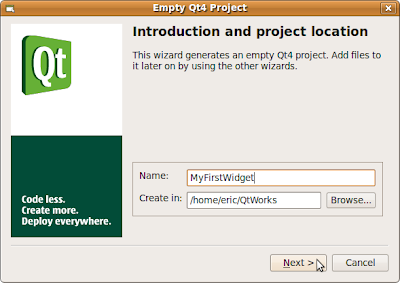
Fill in the Name (MyFirstWidget here) of your project and browse to the locate where to create your project on, and click Next
Then Finish.
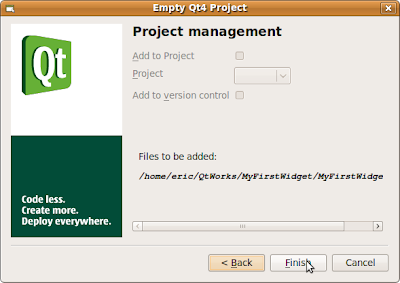
Because what you created is a Empty Qt Project, only a dummy MyFirstWidget.pro will be created.
Create a main.cpp, click File -> New project or Project..., select C++ Source File under C++, and Click OK.
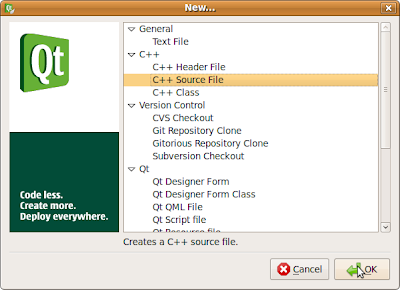
Fill in the Name of the source file, main, click Next, and then Finish.
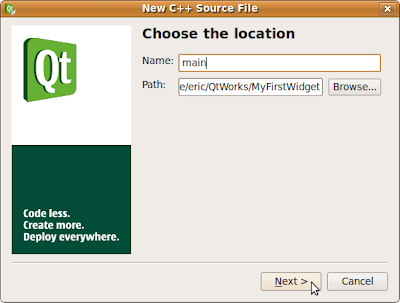
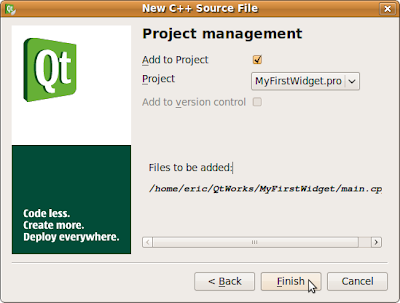
Insert the following code in main.cpp
#include <QtGui>
int main(int argc, char *argv[])
{
QApplication app(argc, argv);
QWidget window;
window.resize(320, 240);
window.setWindowTitle("My First Widget");
window.show();
QPushButton *button = new QPushButton("Hello", &window);
button->move(100, 100);
button->show();
return app.exec();
}
Save All and Click the Run button (Green Arrow).
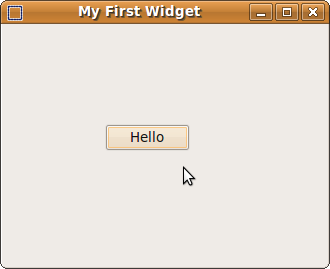
Up to now, we created a Qt application, with a no function button.
Start QtCreator, click File -> New project or Project... on the top menu, Select Empty Qt Project under Project.

Fill in the Name (MyFirstWidget here) of your project and browse to the locate where to create your project on, and click Next

Then Finish.

Because what you created is a Empty Qt Project, only a dummy MyFirstWidget.pro will be created.
Create a main.cpp, click File -> New project or Project..., select C++ Source File under C++, and Click OK.

Fill in the Name of the source file, main, click Next, and then Finish.


Insert the following code in main.cpp
#include <QtGui>
int main(int argc, char *argv[])
{
QApplication app(argc, argv);
QWidget window;
window.resize(320, 240);
window.setWindowTitle("My First Widget");
window.show();
QPushButton *button = new QPushButton("Hello", &window);
button->move(100, 100);
button->show();
return app.exec();
}
Save All and Click the Run button (Green Arrow).

Up to now, we created a Qt application, with a no function button.
Subscribe to:
Posts (Atom)