Thursday, January 21, 2010

Nokia Releases Qt 4.6.1 and Qt Creator 1.3.1

Nokia today released version 4.6.1 of Qt on 19 January 2010: the cross-platform application and UI framework, and version 1.3.1 of Qt Creator: the cross-platform IDE for Qt development . Qt 4.6.1 brings improvements to developers targeting Symbian, most notably introducing a binary compatibility guarantee as announced with the Qt 4.6.0 release in December 2009. Both releases introduce bug fixes and optimizations made since the Qt 4.6.0 and Qt Creator 1.3.0 releases.

Source>>>

Friday, December 4, 2009

Hello! My First Widget, a very simple Qt application with a PushButton.

In this work, I will create a very simple Qt Application with a dummy button (inherite from QPushButton), start from Empty Qt Project.

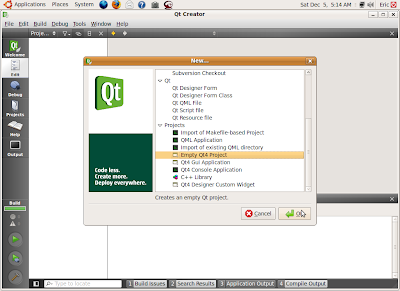
Start QtCreator, click File -> New project or Project... on the top menu, Select Empty Qt Project under Project.

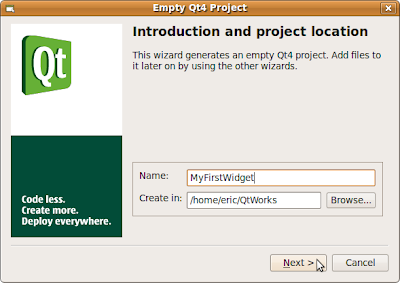
Fill in the Name (MyFirstWidget here) of your project and browse to the locate where to create your project on, and click Next

Then Finish.
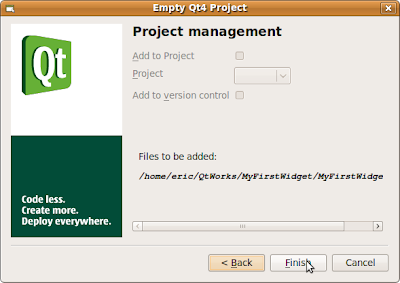

Because what you created is a Empty Qt Project, only a dummy MyFirstWidget.pro will be created.

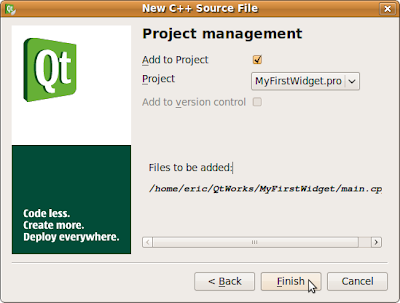
Create a main.cpp, click File -> New project or Project..., select C++ Source File under C++, and Click OK.
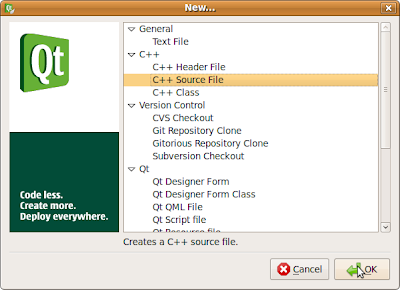

Fill in the Name of the source file, main, click Next, and then Finish.
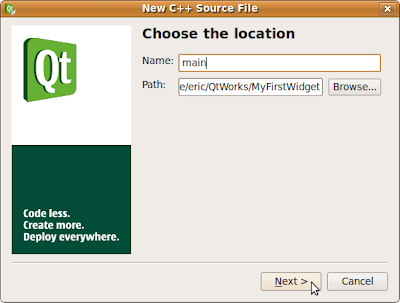


Insert the following code in main.cpp


#include <QtGui>

int main(int argc, char *argv[])
{
QApplication app(argc, argv);
QWidget window;
window.resize(320, 240);
window.setWindowTitle("My First Widget");
window.show();

QPushButton *button = new QPushButton("Hello", &window);
button->move(100, 100);
button->show();
return app.exec();
}


Save All and Click the Run button (Green Arrow).
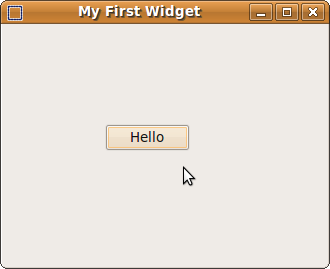

Up to now, we created a Qt application, with a no function button.

Thursday, December 3, 2009

Qt on the Symbian Platform

Qt on the Symbian Platform

With the Qt port to Symbian, we have a broad embedded offering. Qt allows you to code once and deploy across major mobile device and desktop operating systems
while getting to market quickly.

  • Target over 130 million devices with Qt on Symbian
  • Deploy your Qt-based Symbian applications to Maemo, Windows Mobile, Windows CE, and embedded Linux
  • Run your Qt -based Symbian mobile applications on the desktop on Windows, Mac and Unix/Linux (X11)


Qt 4.6 Now Released

The Qt SDK provides everything you need to develop web-enabled desktop, mobile and embedded applications and UIs. It includes the Qt cross-platform application framework and the Qt Creator cross-platform IDE. New features make it even easier to:

  • Create advanced user experiences
  • Ensure better runtime performance
  • Target new desktop and mobile platforms
http://qt.nokia.com/>>

Friday, November 20, 2009

Qt 4.6 and Qt Creator 1.3 Release Candidates Available

17 November 2009, Nokia made available Release Candidates of Qt 4.6: the upcoming new version of its cross-platform application and UI framework; and Qt Creator 1.3; the upcoming new version of its cross platform Qt IDE for download, testing and feedback. The Release Candidates provide a final chance to preview and give feedback on new features before final launch later in Q4 2009. Both releases are available for download at qt.nokia.com/downloads.

Friday, October 30, 2009

Qt Creator 1.2.1 on Ubuntu 9.10

Ubuntu 9.10 is just announced.

To install Qt Creator on Ubuntu 9.10:

- Click Application -> Ubuntu Software Center on the top menu
Install software using Ubuntu Software Center

- Type Qt Creator in the search box, Qt Creator will be shown after a moment. Click the Arrow icon on the right to download and install.
Select Qt Creator to install

- It's Qt Creator 1.2.1
Qt Creator 1.2.1 on Ubuntu 9.10

The default package have no g++ installed. So, if you create a project and build in this moment, you will see the error:

make: g++: Command not found

To install g++ on Ubuntu 9.10:

- Click System -> Administration -> Synaptic Package Manager on the top menu.
Install software using Synaptic Package Manager

- Type g++ in the search box, mark g++ to install and follow the steps.
Install g++ on Ubuntu 9.10

- That's!